Friday, 21 January 2011

Task 9: What is XUL and how is it used? Give examples.

What is XUL exactly ?


That is the right question to ask well, XUL stands for the XML User Interface Language. Since it is XML, it is a declarative language. It provides a rich set of UI widgets that can accelerate the development process. It is a cross-platform language, so you can build your XUL application on Linux, and then run it on Windows. XUL makes heavy use of Web technologies such as JavaScript and CSS. You can even mix HTML directly into a XUL application. 


XUL is synonymous with Netscape and the Mozilla Foundation. From the early days of the Netscape browser, it was meant to be a cross-platform browser. From what I have researched the two browsers have a history of partnership. This required a UI framework that abstracted away OS-specific layout and control widgets. It required a way to allow communication between these abstracted elements and native processes for networking, file I/O, and so on. All of these elements were needed to build applications that weren't just cross-platform, but were designed for working with HTML and Web elements. This framework, known as XPFE (cross-platform front end) was used to build Netscape Communicator as well as the other products in its suite, such as its e-mail and chat clients.


You might be familiar with the rise and fall of Netscape, the company. Its IPO in 1995 marked the beginning of what is now looked back on as the dot com boom. By 1998 the company was not doing well financially, but made some important technological achievements. 

At the heart of this was the Mozilla project. This started with the code for Netscape Communicator 4.0 being released publicly under an open source license. That code-base proved to be too difficult to develop and maintain, but fortunately something better was in the works. Netscape not only made the existing Communicator code open source, but also the code for their next generation layout engine. That layout engine would become Gecko. One of its key features was support for a declarative, XML-based UI language known as XUL.


XUL is a proprietary UI language built for the Gecko engine. It has a wide appeal outside of the developers of Gecko-based Web browsers. That is because it is built on standard technologies, such as XML, JavaScript and CSS.


XUL is an XML language, which gives it a simple syntax and makes it easy to read (and parse)! XUL has a lot of similarities to HTML, so it looks familiar to Web developers. It even allows for XHTML elements to be mixed in with XUL widgets. In many ways, XUL has proven that XML is ideal for creating UI languages, as seen by the rise of similar languages such as MXML (the UI language in the Adobe Flex framework) from Adobe, and XAML (the UI language in .NET 3.0 and the Windows Presentation Foundation) from Microsoft.

Of course, declarative programming does have inherent limits Inevitably some imperative programming is needed. Rather than invent a new language or create some XML-based syntax for this, XUL supports JavaScript. JavaScript as a programming language often gets a bad reputation. It is known as a language that is easy for non-programmers to hack around in and as full of browser-specific extensions and quirks. However, JavaScript is a powerful language that is the backbone of Web application development. After all, JavaScript is the "J" in Ajax. It is a functional programming language, but can be easily used in a procedural or even object-oriented style. XUL brings JavaScript to the forefront as a desktop programming language.

XUL also relies heavily on the DOM implementation in JavaScript—after all, XUL is based on XML.The other pillar of Web development found in XUL is CSS. CSS has become the de facto way to add styling to any Web page. Its cascading nature, allowing styling to be applied to objects and their children while at the same time allowing children to override as many or as few styles as needed, provides tremendous power and flexibility. XUL brings this power and flexibility to desktop applications.

One other thing that JavaScript and CSS have in common is a reputation for having varying behavior from one browser to another. Browser sniffing is common in JavaScript, allowing programmers to code the same function in multiple implementations based on what kind and version of a browser the user is using. It's also found in CSS through the use of conditional styles. If you have done much Web development, then you have probably suffered these browser quirks. If this is the case, then you are going to really enjoy programming in XUL. You have only one browser to worry about in XUL. It's like programming a Web application in a world where everyone uses Firefox.

What kinds of user-interfaces can be made with XUL?

XUL provides the ability to create most elements found in modern graphical interfaces. Some elements that can be created are:
  • Input controls such as textboxes and checkboxes
  • Toolbars with buttons or other content
  • Menus on a menu bar or pop up menus
  • Tabbed dialogs
  • Trees for hierarchical or tabular information
  • Keyboard shortcuts

What Does XUL Code Look Like?

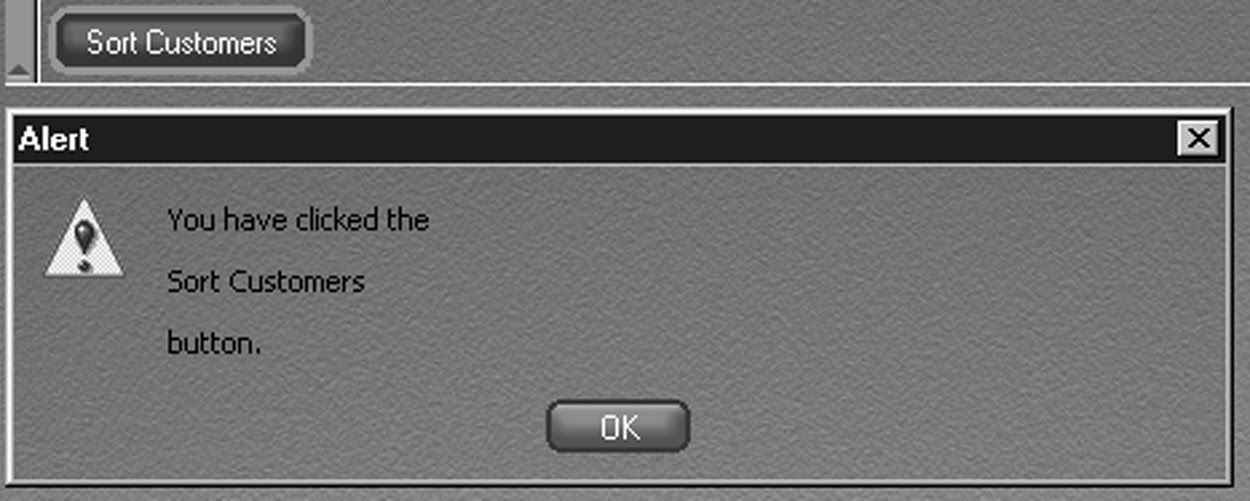
Code Listing 1.0 shows a simple XUL document describing a button interface for a simple XUL interface, the XUL file is an XML document and uses the XUL namespace, and you apply a stylesheet in the second line of the listing. The <window> element is always the root element of a XUL document. This example uses the <toolbox>, <button>, and <toolbar> XUL tags to describe a simple user interface. Code Listing 1.0 also has an event handler associated with it, as defined by the JavaScript <script> tag. This example will create a toolbar, with a button on it called “Sort Customers.” When the button is invoked, from either a key press or a mouse click, the message “You have clicked the Sort Customers button.” is displayed within a JavaScript alert box. Figure 1.1 shows the resulting interface after it has been parsed in the Netscape 6.x browser.

Code 1.0

<?xml version="1.0"?>
<?xml-stylesheet href="chrome://navigator/skin/" type="text/css"?>
<window id="main-window"
xmlns="http://www.mozilla.org/keymaster/gatekeeper/there.is.only.xul"
class="dialog">
<script language="JavaScript">
function alertUser()
{
alert("You have clicked the\n\nSort Customers\n\nbutton.");
}
</script>
<toolbox flex="1">
<toolbar>
<button class="dialog" label="Sort Customers"
oncommand="alertUser();"/>
</toolbar>
</toolbox>
</window>


Figure 1.1


Reference: http://www.xul.fr/en-xml-xul.html [Accessed 19/01/2011]

TASK 9: What is XIML and how is it used? Give examples.

DEFINTION

XIML is an XML-based "interface representation language for universal support of functionality across the entire lifecycle of a user interface: design, development, operation, management, organization, and evaluation " (Puerta, 2002).

Abstract  

In recent years, there have been a number of industry and academic efforts to standardize the representation of many types of data in order to facilitate the interoperability of applications. There is, however, no comparable effort aimed at interaction data, the data that relates to user interfaces. We introduce XIML (eXtensible Interface Markup Language), a proposed common representation for interaction data. We claim that XIML fulfills the requirements that we have found essential for a language of its type: (1) it supports design, operation, organization, and evaluation functions, (2) it is able to relate the abstract and concrete data elements of an interface, and (3) it enables knowledge-based systems to exploit the captured data. In this paper, we introduce the characteristics of XIML, its scope and validation, and a proposed path for industry adoption.


In May 2008 XIML was selected as a finalist for the following awards:

  •  ZDNet Australia and CeBIT 2008 Emerging Innovation Award.
  •  CeBIT.AU Excellence in New Media Award 2008.
  • CeBIT.AU Early Innovators Award 2008.
  • TechRamp 2008 competition, demoed at Transaction 2.0 Conference.
XIML is the easiest way to build interactive website. It is very flexible and fully configurable, any creative idea can be implemented without any limitations. Its markup language is very intuitive and so simple, everyone can understand and use.

Thebasic example below is to get the feel for XIML.  4 objects - 4 lines of code. Simple and straightforward:

Features of XIML

<el  eltype="txt"  x="23"  y="18"  datatype="static"  dataval="Hello, World!"  font="Verdana"  color="0xff0000"  size="30" />

<el  eltype="line"  x="20"  y="60"  x2="R-20"  y2="60"  c="0x000000"  a="100"  t="1" />
         
<el  eltype="rect"  x="30"  y="75"  w="140"  h="25"  c="0x00ff00"  a="50"  r="10" />

<el  eltype="bord"  x="50"  y="90"  w="170"  h="25"  c="0x0000ff"  a="50"  t="3"  r="5" />

Here is the Result(There is quite a problem with the image to be displayed on the blog the anyway picture represents two rectangular squares aligned to together formatted with the use of XIML) 


Hello, World!


In a more practical sense, however, it is to be expected that an XIML specification would support a relatively small number of components with one major type of element defined per component. For example, XIML 1.0 predefines five basic interface components, namely task, domain, user, dialog, and presentation. While the first three components can be characterized as abstract, the last two can be described as concrete:

The components predefined in the first version of XIML were selected by studying a large variety of previous efforts in creating interface models. Furthermore, XIML is extensible, so that other components can be added in the future once their presence is justified.
XIML can be used to effectively display a single interface definition on any number of target devices. This is made possible by the strict separation that XIML makes between the definition of the user interface and the rendering of that interface (i.e. the actual display of the interface on a target device).

The structure of XIML


                                                    XIML
                                           

COMPONENTS                  RELATIONS                     ATTRIBUTES

       
ELEMENTS                     STATEMENTS                      DEFINITIONS

References: http://www.crunchbase.com/company/ximl [Accessed on 19/01/2011]

Thursday, 30 December 2010

Task 8: What is the value of XML in e-commerce? Give examples of its usage.

E-commerce Applications using XML

As e-commerce and network Technology continues to evolve, online payment to become an essential in the Development process platform. In this trading platform, and always have a great deal of data in mobile, how to use a new technology to manage these important data. This paper is the use of XML technology to achieve the data flow of the parties to the transaction more concerned about the problems - the safe and efficient flow of data.

Task 8: Why is the W3C XML schema important? Give examples of its role.

As I Have already mentioned and describe in my previous post about DTD. Prior to further elaborating more on XML schema or XSD. I first want to give a concise indication on how decisive the XML schema is in conditions of Validation of data which is very crucial.

To iterate again a Document Type Definition (DTD) defines the legal building blocks of an XML document. It defines the document structure with a list of legal elements and attributes. A DTD can be declared inline inside an XML document, or as an external reference.

Document Type Definitions (DTDs) and XML Schemas are key technologies in this area. Although neither is strictly required for XML development, both DTDs and XML Schemas are important parts of the XML toolbox. DTDs have been around for over twenty years as a part of SGML, while XML Schemas are relative newcomers. Though they use very different syntax and take different approaches to the task of describing document structures, both mechanisms definitely occupy the same turf. The W3C seems to be grooming XML Schemas as a replacement for DTDs, but it isn't yet clear that how quickly the transition will be made. DTDs are here-and-now, while XML Schemas, in large part, are for the future.

Data Type Problems

Validation


A valid document includes a document type declaration that identifies the DTD the document satisfies. The DTD lists all the elements, attributes, and entities the document uses and the contexts in which it uses them. The DTD may list items the document does not use as well. Validity operates on the principle that everything not permitted is forbidden. Everything in the document must match a declaration in the DTD. If a document has a document type declaration and the document satisfies the DTD that the document type declaration indicates, then the document is said to be valid. If it does not, it is said to be invalid.


There are many things the DTD does not say. In particular, it does not say the following:

·         What the root element of the document is
·         How many of instances of each kind of element appear in the document
·         What the character data inside the elements looks like
·         The semantic meaning of an element; for instance, whether it contains a date or a person's name

DTDs allow you to place some constraints on the form an XML document takes, but there can be quite a bit of flexibility within those limits. A DTD never says anything about the length, structure, meaning, allowed values, or other aspects of the text content of an element.

Validity is optional. A parser reading an XML document may or may not check for validity. If it does check for validity, the program receiving data from the parser may or may not care about validity errors. In some cases, such as putting records into a database, a validity error may be quite serious, indicating that a required field is missing, for example. In other cases, rendering a web page perhaps, a validity error may not be so important, and you can work around it. Well-formedness is required of all XML documents; validity is not. Your documents and your programs can use it or not as you find it beneficial.

A Simple DTD Example

For example  to describe a person. Say the person had a name and three professions. The name had a first name and a last name. The particular person can be called  John Duffles. However, that's not relevant for DTDs. A DTD only describes the general type, not the specific instance. A DTD for person documents would say that a person element contains one name child element and zero or more profession child elements. It would further say that each name element contains a first_name child element and a last_name child element. Finally it would state that the first_name, last_name, and profession elements all contain text. The example below is a DTD that describes such a person element.

Example1.1  A DTD for the person


<!ELEMENT person     (name, profession*)>
<!ELEMENT name       (first_name, last_name)>
<!ELEMENT first_name (#PCDATA)>
<!ELEMENT last_name  (#PCDATA)>
<!ELEMENT profession (#PCDATA)>

This DTD example above would probably be stored in a separate file from the documents it describes. This allows it to be easily referenced from multiple XML documents. However, it can be included inside the XML document if that's convenient, using the document type declaration. If it is stored in a separate file, then that file would most likely be named person.dtd, or something similar. The .dtd extension is fairly standard though not specifically required by the XML specification. If this file were served by a web server, it would be given the MIME media type application/xml-dtd.

Each line of example above is an element declaration. The first line declares the element; the second line declares the personname element; the third line declares the first_name element; and so on. However, the line breaks aren't relevant except for legibility. Although it's customary to put only one declaration on each line, it's not required. Long declarations can even span multiple lines.

The first element declaration in example above states that each person element must contain exactly one name child element followed by zero or more profession elements. The asterisk after profession stands for "zero or more." Thus, every person must have a name and may or may not have a profession or multiple professions. However, the name must come before all professions. For example, this person element is valid:

<person>
  <name>
    <first_name>John </first_name>
    <last_name>Duffles</last_name>
  </name>
</person>

However, this person element is not valid because it omits the name:

<person>
  <profession>computer scientist</profession>
  <profession>mathematician</profession>
  <profession>cryptographer</profession>
</person>

This person element is not valid because a profession element comes before the name:

<person>
  <profession>computer scientist</profession>
  <name>
    <first_name>Alan</first_name>
    <last_name>Turing</last_name>
  </name>
  <profession>mathematician</profession>
  <profession>cryptographer</profession>
</person>

The person element may not contain any element except those listed in its declaration. The only extra character data it can contain is whitespace. For example, this is an invalid person publication element: element because it adds a

<person>
  <name>
    <first_name>Alan</first_name>
    <last_name>Turing</last_name>
  </name>
  <profession>mathematician</profession>
  <profession>cryptographer</profession>
  <publication>On Computable Numbers...</publication>
</person>


This is an invalid person element because it adds some text outside the allowed children:

<person>
  <name>
    <first_name>Alan</first_name>
    <last_name>Turing</last_name>
  </name>
  was a <profession>computer scientist</profession>,
  a <profession>mathematician</profession>, and a
  <profession>cryptographer</profession>
</person>

In all these examples of invalid elements, you could change the DTD to make these elements valid. All the examples are well-formed, after all. However, with the DTD in example 1.1, they are not valid.

The name declaration says that each name element must contain exactly one first_namelast_name element. All other variations are forbidden. element followed by exactly one

The remaining three declarations--first_name, last_name, and profession--all say that their elements must contain #PCDATA. This is a DTD keyword standing for parsed character data --that is, raw text possibly containing entity references such as &amp; and &lt;, but not containing any tags or child elements.

In the example 1.1placed the most complicated and highest-level declaration at the top. However, that's not required. For instance in example 1.2 below is an equivalent DTD that simply reorders the declarations. DTDs allow forward, backward, and circular references to other declarations.

Example 1-2. An alternate DTD for the person element

<!ELEMENT last_name  (#PCDATA)>
<!ELEMENT profession (#PCDATA)>
<!ELEMENT name       (first_name, last_name)>
<!ELEMENT person     (name, profession*)>


Example 1-3. A valid person document


<?xml version="1.0" standalone="no"?>
<!DOCTYPE person SYSTEM "http://www.cafeconleche.org/dtds/person.dtd">
<person>
  <name>
    <first_name>John Duffles</first_name>
    <last_name>John Duffles</last_name>
  </name>
  <profession>computer scientist</profession>
  <profession>mathematician</profession>
  <profession>cryptographer</profession>
</person>


XML Schemas

A Simple XML Schema

Below is a simple XML schema, which is made up of one complex type element with two child simple type elements

<?xml version="1.0" encoding="UTF-8"?>
<xs:schema xmlns:xs="http://www.w3.org/2001/XMLSchema">
  <xs:element name="Author">
    <xs:complexType>
      <xs:sequence>
        <xs:element name="FirstName" type="xs:string" />
        <xs:element name="LastName" type="xs:string" />
      </xs:sequence>
    </xs:complexType>
  </xs:element>
</xs:schema>


As you can see, an XML schema is an XML document and must follow all the syntax rules of any other XML document; that is, it must be well formed. XML schemas also have to follow the rules defined in the "Schema of schemas," which defines, among other things, the structure of and element and attribute names in an XML schema.

Although it is not required, it is a common practice to use the xs qualifier to identify Schema elements and types we have to validate it first which I will show below.


The document element of XML schemas is xs:schema. It takes the attribute xmlns:xs with the value of http://www.w3.org/2001/XMLSchema, indicating that the document should follow the rules of XML Schema. This will be clearer after you learn about namespaces.

In this XML schema, we see a xs:element element within the xs:schema element. xs:elementAuthor as a complex type element, which contains a sequence of two elements: FirstName and LastName, both of which are of the simple type, string. is used to define an element. In this case it defines the element

Validating an XML Instance Document

As I have explained on the above code there is an  example of a simple XML schema, which defined the structure of an Author element. The code sample below shows a valid XML instance of this XML schema.

<?xml version="1.0"?>
<Author xmlns:xsi="http://www.w3.org/2001/XMLSchema-instance"
 xsi:noNamespaceSchemaLocation="Author.xsd">
    <FirstName>John</FirstName>
    <LastName>Duffles</LastName>
</Author>

The above code is a simple XML document. Its document element is Author, which contains two child elements: FirstName and LastName, just as the associated XML schema requires.

The xmlns:xsi attribute of the document element indicates that this XML document is an instance of an XML schema. The document is tied to a specific XML schema with the xsi:noNamespaceSchemaLocation attribute.


Reference: Eric van der Vlist (2002) Dyanamic The W3C's Object-Oriented Descriptions for XML (page 5-10)[Online] Viewed at [http://oreilly.com/catalog/9780596002527/preview]